图片上传图床与备份回退策略
2022-04-13 01:17:33 浏览: 995次
AI评分:90
原因:The article offers a clear and practical explanation of implementing image upload functionality with cloud storage integration, local backup, and rollback strategies. It excels in technical depth through well-documented Java code snippets and thoughtful handling of error cases. The structured flow with subsections enhances readability. However, the heavy reliance on verbose code blocks slightly impacts accessibility, and the concluding personal notes, while engaging, feel tangential. Overall, it effectively communicates a robust solution with minor room for streamlining non-technical content.
今天完成了服务器端的图片上图床、备份、增加记录、获取列表功能。
主要完成的技术要点是对接图床,并且在本地备份(相对于服务器的本地),然后记录计入数据库。
设计流程
先来展示一下我设计的基本流程:
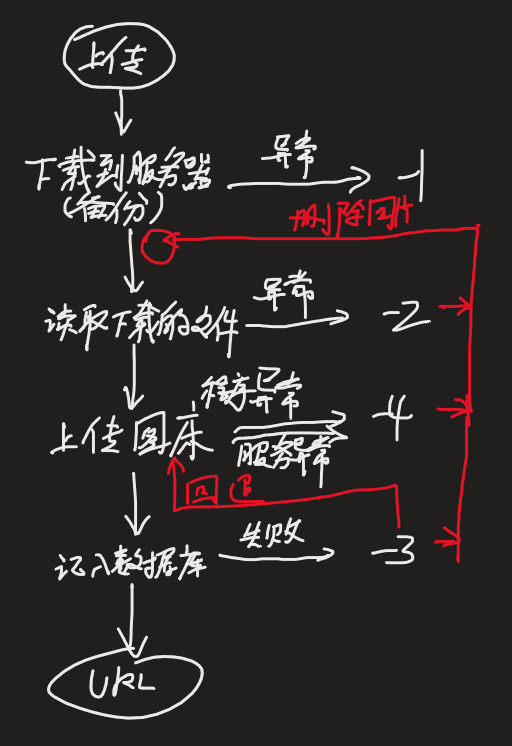
整个流程中,为了尽量让出现异常错误产生的“垃圾”文件数据进行回退,从而保证资源利用率。
图床api的包装与修改
在原有官方提供的java版本api后,经过简单修改即可上传文件。这里有一部分涉及到oauth授权。
public static JSONObject dogeAPIGet(String apiPath, byte[] bytes) throws IOException, JSONException {

	String signStr = apiPath + "\n";
	ByteArrayOutputStream bao = new ByteArrayOutputStream();
	bao.write(signStr.getBytes());
	bao.write(bytes);
	byte[] res = bao.toByteArray();
	bao.close();

	String sign = "";
	try {
		Mac mac = Mac.getInstance("HmacSHA1");
		mac.init(new SecretKeySpec(secretKey.getBytes(), "HmacSHA1"));
		sign = new String(new Hex().encode(mac.doFinal(res)), StandardCharsets.UTF_8);
		// Hex 来自 org.apache.commons.codec.binary.Hex
	} catch (NoSuchAlgorithmException | InvalidKeyException e) {
		e.printStackTrace();
		throw new RuntimeException(e.getMessage());
	}
	String authorization = "TOKEN " + accessKey + ':' + sign; // 获取到token

	URL u = new URL("https://api.dogecloud.com" + apiPath);
	HttpURLConnection conn = (HttpURLConnection) u.openConnection();
	conn.setDoOutput(true);
	conn.setRequestMethod("POST");
	conn.setRequestProperty( "Authorization", authorization);
	OutputStream os = conn.getOutputStream();
	os.write(bytes);
	os.close();
	StringBuilder retJSON = new StringBuilder();
	if(conn.getResponseCode() == HttpURLConnection.HTTP_OK){
		String readLine = "";
		try (BufferedReader responseReader=new BufferedReader(new InputStreamReader(conn.getInputStream(), StandardCharsets.UTF_8))) {
			while((readLine=responseReader.readLine())!=null){
				retJSON.append(readLine).append("\n");
			}
		}
		JSONObject ret = new JSONObject(retJSON.toString());
		if (ret.getInt("code") != 200) {
			System.err.println("{\"error\":\"API 返回错误:" + ret.getString("msg") + "\"}");
		} else {
			JSONObject output = new JSONObject();
			JSONObject data = ret.getJSONObject("data");
			return data;
		}
	} else {
		System.err.println("{\"error\":\"网络错误:" + conn.getResponseCode() + "\"}");
	}
	return null;
}
图片上传图床与备份回退
图片的每一次错误,如果不加以删除,那么后期维护起来也会非常麻烦。
图片如果完全相信图床服务器的运营也是错误的想法,毕竟谁知道哪天倒了(没有咒,求饶)。
所以能上传的图床的前提是本地留有备份和记录。基于这些约束,写了如下代码:
public DogeResult uploadFile(MultipartFile file, Integer aid) {
	DogeResult result = new DogeResult(-1);

	String targetPathUri = "img/" + aid + "/" ; // => img/2/
	String filename = System.currentTimeMillis() + ".png"; // => 45648945123.png

	String localPath = properties.getLocalImgPath() + targetPathUri; // =>; C:/data/dreamcenter/img/2/
	File f = new File(localPath);
	f.mkdirs();

	// save to local path => -1
	try {
		file.transferTo(new File(localPath + filename));
	} catch (IOException e) {
		e.printStackTrace();
		return result;
	}

	// read the saved file => -2
	File okFile = new File(localPath + filename);
	FileInputStream fis = null;
	ByteArrayOutputStream bao = null;
	try {
		fis = new FileInputStream(okFile);
		bao = new ByteArrayOutputStream();
		byte[] temp = new byte[1024];
		int len;
		while((len = fis.read(temp))!=-1){
			bao.write(temp,0,len);
		}
	} catch (IOException e) {
		okFile.delete();
		e.printStackTrace();
		result.setErrno(-2);
		return result;
	} finally {
		... // 关闭bao和fis流
	}

	// save to doge => -3 / -4
	try {
		String req = "?bucket=dreamcenter&key=" + targetPathUri + filename;
		JSONObject jsonObject = DogeHelper.dogeAPIGet("/oss/upload/put.json" + req, bao.toByteArray());
		if (jsonObject != null) {
			result.setErrno(0);
			String base = properties.getCloudImgPath();
			String key = jsonObject.getString("key");
			result.addImage(base + key,null,base + key);

			// into database
			Integer res = imageDao.insertImg(new Image(null, aid, filename.split("\\.")[0],
					TimeRelated.getCurrentTime(), base + key, null));
			if (res != 1) {
				okFile.delete();
				DogeHelper.dogeAPIGet("/oss/file/delete.json?bucket=dreamcenter",
						("[\"" + targetPathUri + filename + "\"]").getBytes());
				result.setErrno(-3);
			}
		} else {
			okFile.delete();
			result.setErrno(-4);
		}
	} catch (IOException | RuntimeException | JSONException e ) {
		okFile.delete();
		result.setErrno(-4);
		e.printStackTrace();
	}
	return result;
}
其实在做这个个人主页之前就已经测试了自己能不能接入成功,所以才敢下决定对接的,
最开始是打算接入百度网盘,然而百度只能调取一些基础的服务,图片上传貌似也要“提升权限”!
当时好不容易把百度的分片上传原理和需求进行了java封装,结果告诉我权限不够,
打击还是非常大的,当然后续的仓库模块肯定是要借用百度网盘的,
不过预计也仅仅停留在列表获取和链接下载上罢了。
今天也是有收获的一天,明天继续加油,争取把图片模块(回忆)完成个50%,后天再接入博客和动态,
之后继续优化图片模块的图片展示,最后进行模块访问统计,那么第一阶段就告一段落了,哈哈!
加油!
#springboot#建站
- 上一篇:后台回忆页专辑图片陈列
- 下一篇:懒加载与日期文字化